
Sesame Street Alphabet Kitchen
Sesame WorkshopEducational
3.8927.00 Reviews
- Version
- 3.3
- Installs
- 10.00M
- Age Rating
- Everyone
Screenshots
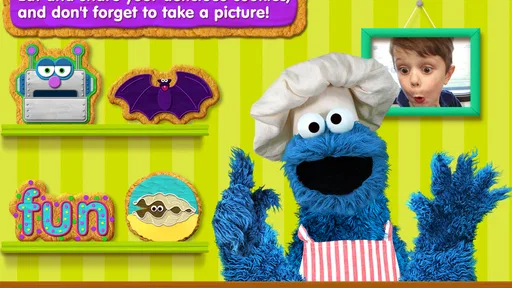
Our Review of Sesame Street Alphabet Kitchen
 Analysis by Appyee
When I choose a literacy app for a young child, I look for more than familiar characters: the activities should give the child something to do with letters, fit into a short everyday routine, and leave room for a grown-up to join in. Sesame Street Alphabet Kitchen makes a clear case for itself on the first two points, especially for a beginner who responds to Elmo and Cookie Monster. I see it as a way to make early practice inviting, not as a substitute for books, conversation, or a structured reading course.
One practical question is whether the child is at the right stage. The game is aimed at early literacy and vocabulary, so it suits a child who is starting to notice letters and connect them with words. A child who already reads simple text may be ready for more demanding activities. I would judge the fit by watching what happens after a short session: does the child want to name a letter or talk about a word, or are they simply tapping through without much interest?
Sesame Workshop developed this free educational game for everyone, and it has been available since September 16, 2016. The current version is 3.3; on Android, it requires version 8.0 or later. It has passed ten million installs, with an average rating of 3.9 from roughly sixteen thousand ratings. Those figures show that many families have tried it, but I would still put a child’s age, interests, and learning needs ahead of popularity when deciding whether it belongs on the device.
How the kitchen turns letters into a usable learning routine
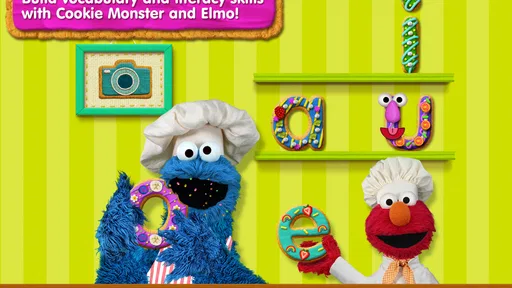
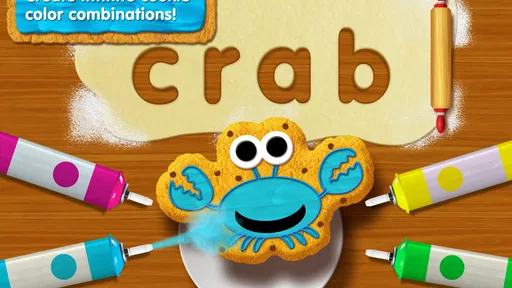
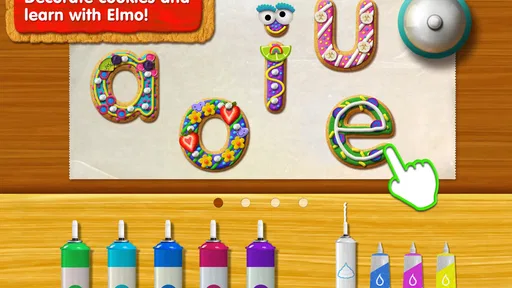
The central idea is easy for a child to understand. Elmo and Cookie Monster make the learning feel like an activity with familiar characters rather than a formal lesson. Children practice early literacy skills while working with vocabulary, and the kitchen theme gives those exercises a setting that is more memorable than a bare alphabet screen.
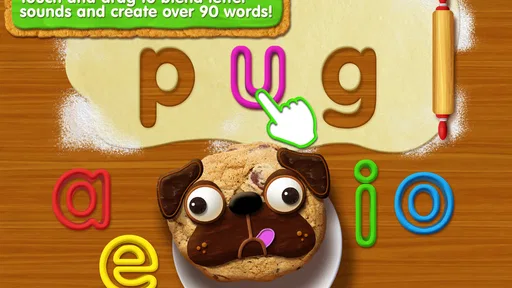
That framing matters for younger learners. A child who resists a worksheet may be willing to spend a few minutes helping a favorite Sesame Street character. I also like that the app connects letters with words instead of treating the alphabet as a sequence to memorize in isolation. For a beginner, seeing a letter as part of a word is a more useful bridge toward reading than simply reciting letter names.
In everyday use, I would place it in a small learning routine rather than hand over the device for an open-ended session. A parent could use it after breakfast while getting ready for the day, or during a quiet few minutes before dinner. The most productive approach is to let the child play briefly, then ask one simple question away from the screen: “What word did you see that starts with that letter?” That extra conversation helps transfer recognition from the game to real speech and print.
The character presentation is one of the strongest reasons to choose this particular title. Elmo and Cookie Monster give the activities personality, and Sesame Workshop understands how to make early learning feel welcoming without making the child feel tested. That is especially helpful for children who are still building confidence and may become discouraged by apps that correct them too sharply or move too quickly.
What parents can realistically expect from the learning
This is best understood as reinforcement. It can give a child repeated contact with letters, sounds, and familiar vocabulary, but it should not replace reading aloud, talking, drawing letters, or looking at physical books together. The game can start a conversation about words; it cannot provide the full language experience of an adult responding to a child’s questions.
I would also avoid treating its rating as a measure of educational quality alone. A 3.9 average across about sixteen thousand ratings suggests that families have found it useful but that experiences are not universally perfect. That feels believable for a children’s game: device differences, a child’s age, attention span, and expectations about available content can all affect satisfaction.
One practical strength is its low barrier to trying it. The download is free, which lets a family see whether the style suits a particular child before committing money. There are in-app purchases priced at $2.99 per item, so I would review the purchase settings with a child before leaving the device unattended. The free entry point is convenient, but parents should still pay attention to what becomes available during use and whether the child is likely to request additional items.
That trade-off is more important here than it might be in an adult app. A preschooler may not understand the difference between playing and buying, and a parent may assume that “free” means every part is included. I would make the decision together with the child: try the accessible material first, observe whether it holds attention, and only then consider whether an extra item is worthwhile.
Three ways to get more value than a quick tap-through
My first tip is to use the game as a prompt for sound practice, not just visual matching. When a letter appears, say its sound naturally and invite the child to name another word beginning with it. If the child gives an unexpected answer, keep the exchange positive and repeat the sound rather than turning the moment into a correction drill. This makes the app part of a larger literacy habit.
Second, alternate between independent play and shared play. A child can explore the activity alone for a short time, but an adult can sit nearby and notice which letters or words cause hesitation. That observation is more useful than simply asking whether the child “liked” the game. If a particular letter keeps causing trouble, the parent can revisit it later with magnetic letters, a picture book, or objects around the home.
Third, stop while the activity is still enjoyable. Early-literacy practice does not need to become a long session. Ending after a successful moment can make the next visit easier, especially for a child with a short attention span. This is a small but meaningful advantage of using a game like this in controlled bursts: the parent can shape the rhythm instead of expecting the app to teach everything in one sitting.
A fourth useful approach is to connect the kitchen theme to real household language. While preparing food, a parent might point out a label, name an ingredient, or ask which sound begins a word. The game then becomes a bridge to print and vocabulary in the child’s surroundings. That connection is more valuable than letting the screen remain a separate little world.
The limitations that affect the decision
The biggest limitation is scope. Children who already recognize most letters and read simple words may not find enough challenge here. The app is aimed at the beginning of the literacy journey, so it is not the right choice for a child looking for stories with sustained reading, spelling progression, comprehension questions, or a clear path through multiple reading levels.
It also depends heavily on adult expectations. If a parent wants a quiet app that teaches without any follow-up, this may feel less complete. The strongest results come when someone talks with the child, repeats vocabulary, and notices where help is needed. That is not a flaw in the game itself, but it does mean the app should be treated as a shared learning aid rather than an electronic babysitter.
The free model may create another point of friction. Although the app costs nothing to start, individual in-app purchases are $2.99 each. Some families will appreciate being able to add material selectively, while others will prefer a single upfront purchase with no additional decisions. If predictable spending is a priority, a paid alternative with all content included may be easier to manage, even if it is less familiar or less appealing to the child.
Sesame Street branding is a strength for children who already enjoy Elmo and Cookie Monster, but it can be less persuasive for a child who does not know those characters. In that case, a phonics app built around a more systematic sequence might hold attention better. Likewise, children who learn best through handwriting may gain more from an app that emphasizes tracing and letter formation, paired with pencil-and-paper practice.
There is also a difference between vocabulary exposure and deep vocabulary learning. Meeting a word in a playful context is a good first step, but children usually need to hear and use new words several times before they become part of active speech. I would therefore judge the game by whether it sparks useful repetition, not by expecting every new word to stick after one session.
Choosing it over other early-learning options
The usual alternatives each serve a different need. Alphabet videos ask little of a child beyond watching, while a paper book lets an adult pause anywhere and follow the child’s questions. A structured phonics program is a better fit when a family wants a deliberate sequence of skills; tracing activities are more appropriate when letter formation is the priority. This game sits between passive viewing and formal instruction: it gives a beginner a playful way to engage with letters and words, with familiar characters doing much of the inviting.
That middle ground is useful, but it is also a trade-off. I would not make it the only literacy activity in a home, especially if the child needs systematic teaching or more advanced reading practice. Pairing it with read-aloud time and ordinary talk about signs, labels, and objects gives the app a job it can do well without asking it to do everything.
A realistic use case is a short turn while a parent prepares dinner. The child can play nearby, and the adult can join for a moment when a letter or word catches their attention, then bring that word into conversation at the table. If the child is tired or screen time makes the evening harder, I would skip the session rather than insist on a learning routine. The point is to make practice easy to return to, not to turn every spare minute into a lesson.
Who should install it, and who should look elsewhere
I would recommend it to families with a young child beginning to explore letters and words, particularly when familiar Sesame Street characters make the difference between cooperation and resistance. It is also a sensible choice for a parent who wants a free starting point and is comfortable adding conversation around the screen. The Everyone rating makes it broadly suitable for family use, though an adult should still guide purchases and choose an appropriate session length.
It can work well for children who need repetition without feeling that they are repeating a lesson. A child who enjoys character-led play may return to the alphabet more willingly here than in a plain flashcard app. It is also useful during transitions, such as a short wait at home or a calm period before bedtime, provided the device itself does not make winding down harder.
I would skip it if your child is already reading independently and needs richer material. In that situation, an early-reader library, a structured phonics course, or a spelling game with graduated difficulty would probably offer more progress. I would also choose another option if you specifically want handwriting instruction, detailed progress tracking, or a fully comprehensive curriculum.
Compared with ordinary alphabet videos, the game has a practical advantage: the child is doing something with the letters rather than only watching them. Compared with physical books, however, it is less flexible because an adult cannot easily pause and expand every idea in the same way. Compared with a systematic phonics program, it feels more inviting and character-driven, but likely less suitable as the sole method for teaching reading. Those distinctions make the choice clearer: this is a playful supplement, not a replacement for every other literacy tool.
My final recommendation for a family
After using it as a reviewer would, I see Sesame Street Alphabet Kitchen as a focused and approachable introduction to early literacy. Its best evidence is not that it promises everything, but that its letters and vocabulary are wrapped in a setting young children may actually want to revisit. Elmo and Cookie Monster provide warmth, while the free download makes experimentation easy.
The sensible way to use it is to keep sessions short, sit with the child often enough to turn game moments into spoken practice, and connect the words to books and objects outside the device. Parents should also remember that the free starting point includes optional purchases at $2.99 per item, and they should decide in advance whether those additions fit the family’s needs.
My verdict is positive with clear boundaries. This is a good first step for a character-loving beginner, not a complete reading course. If your child is just becoming curious about letters, I would try it and watch for genuine engagement rather than expecting instant progress. If the child is already beyond basic alphabet work, or if you need structured phonics, handwriting, or advanced reading practice, another educational app will be a better investment of attention.
Privacy and Permissions
See what permissions an app requests and how it handles your data.
- Camera
- take pictures and videos
- Other
- view network connections, full network access, prevent device from sleeping, Google Play license check
Verdict
Strengths of Sesame Street Alphabet Kitchen
- Fun baking gameplay makes letter practice feel like play.
- Bright Sesame Street visuals are appealing to young children.
- Simple controls are suitable for preschool users.
- Familiar characters can encourage children to keep playing.
- Short activities work well for quick learning sessions.
Limitations of Sesame Street Alphabet Kitchen
- Some children may outgrow the basic gameplay quickly.
- Requires a compatible device and enough storage space.
- Learning content focuses mainly on letters and spelling.
- Repeated activities may feel limited after extended play.
- Parental guidance may still be needed for younger children.
Other Releases by Sesame Workshop
View All
Sesame Street Art Maker
Art & Design4.0
Similar Picks in This Category
View All
Little Panda Policeman
BabyBus4.0

Monster Trucks Game for Kids 2
Raz Games4.1

Little Panda's Chinese Recipes
BabyBus4.4

Little Panda's Restaurant
BabyBus4.4

Little Panda's Ice Cream Games
BabyBus4.3

Baby Panda Care
BabyBus3.8
Frequently Asked Questions
What is Sesame Street Alphabet Kitchen?
Sesame Street Alphabet Kitchen is an educational children’s app designed to help young learners practice letters, sounds, spelling, and simple vocabulary through playful cooking-themed activities. Children interact with familiar Sesame Street characters while preparing virtual recipes and completing alphabet challenges. The colorful presentation and gentle instructions make it especially suitable for preschoolers who are beginning to recognize letters and connect them with words.
What can children learn while playing Sesame Street Alphabet Kitchen?
The app focuses primarily on early literacy skills. Depending on the activity, children can practice identifying uppercase and lowercase letters, matching letters with their sounds, recognizing simple words, and improving basic spelling awareness. The cooking format also encourages following instructions and completing tasks in sequence. It is best viewed as a playful learning supplement rather than a complete replacement for reading practice with parents or teachers.
Is Sesame Street Alphabet Kitchen suitable for preschool children?
Yes, Sesame Street Alphabet Kitchen is mainly aimed at preschool-aged children and early learners. Its simple touch controls, recognizable characters, bright graphics, and short activities make it accessible to children who may not yet be confident readers. Younger children might still need occasional guidance, particularly when navigating menus or understanding an activity for the first time, but the overall design is approachable and child-friendly.
Does Sesame Street Alphabet Kitchen require an internet connection or include in-app purchases?
Requirements can vary depending on the version and the device’s operating system, so parents should check the current Google Play or App Store listing before downloading. Some features may work offline after installation, while updates or certain content can require internet access. It is also advisable to review the store page and parental settings for advertising, purchases, or additional downloadable content before allowing a child to play.
Is Sesame Street Alphabet Kitchen safe and worthwhile for children?
The app is built around Sesame Street’s familiar educational style and provides a more focused experience than many general entertainment games. It avoids complicated controls and gives children a constructive way to practice early alphabet skills. Parents should still supervise initial use, check privacy and parental-control settings, and balance screen time with books and offline activities. For families seeking a gentle literacy game, it can be a worthwhile addition.
Play our best games!


